
Docs
Rotor setup
RT-21, GS-232, Hamlib rotors, 180 degree elevation, and AZ-only mounts.
Rotator pointing is optional. Connect a controller when you want the antenna to follow the pass.
Controllers
- Green Heron RT-21, azimuth and elevation on dual serial
- GS-232 and K3NG
- Hamlib serial
- Hamlib TCP (
rotctld). PSTRotator is one program that can providerotctld.
Elevation
180 degree elevation is supported.
AZ-only mounts keep elevation fixed. The Device & Test panel has a checkbox labeled “AZ only (fixed elevation)”.
Hamlib TCP
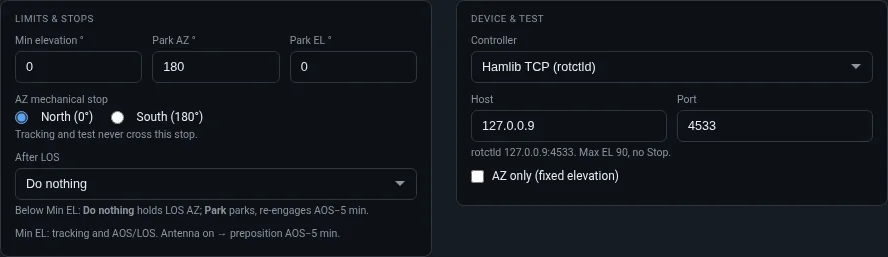
The rotor screen is two panels.
Limits & stops. Minimum elevation, park azimuth, park elevation, and the azimuth mechanical stop: north at 0° or south at 180°. Tracking and test do not cross that stop. After LOS chooses what the rotator does when the satellite sets. With the antenna set to turn on, the panel notes a preposition at AOS−5 minutes.
Device & test. Choose the controller. For Hamlib TCP, enter the host and port where rotctld is listening. The line under those fields reports the connection and the maximum elevation the controller advertised. Built-in rotor tests run from this panel.
Auto Engage
Optional Auto Engage turns the radio and antenna on at T-5 and off after LOS.